


Always On Edge Lighting & AOD
3.53.31K Reviews
App Specs
- Version
- 9.6.8
- Updated On
- License
- Free
- Downloads
- 10,000,000+
- Developer
- Dubiaz
- Categories
- Personalization
- Platform
- Android
Screenshots
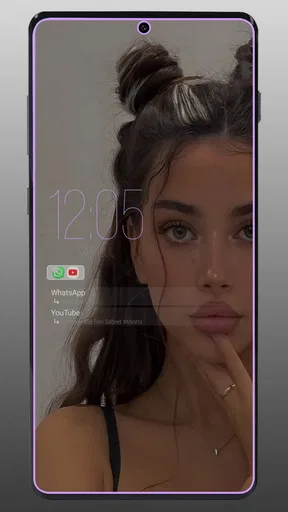
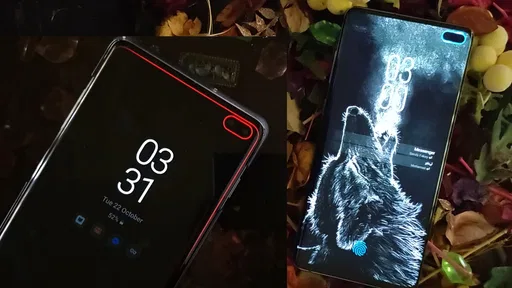
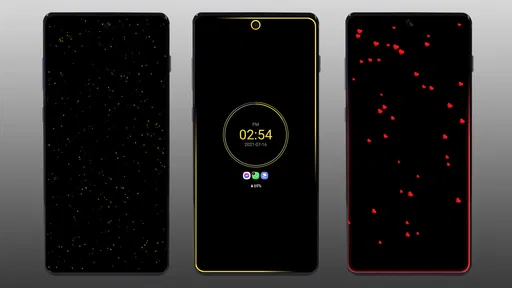
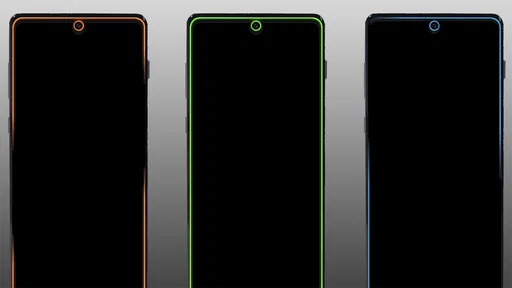
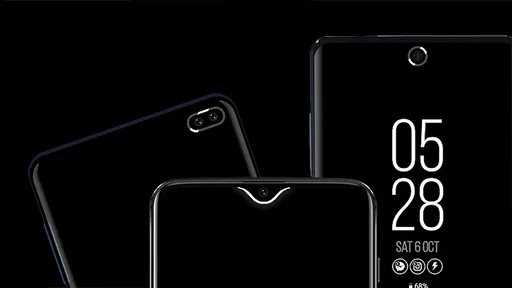
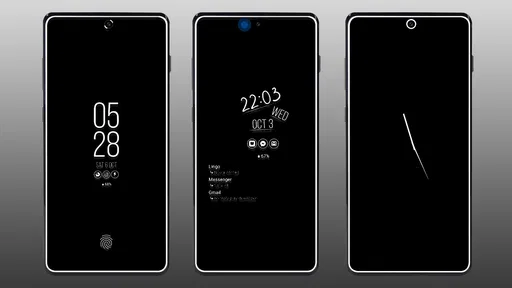
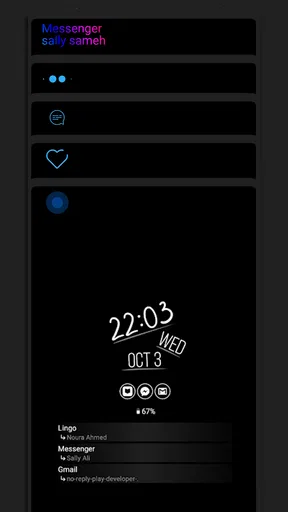
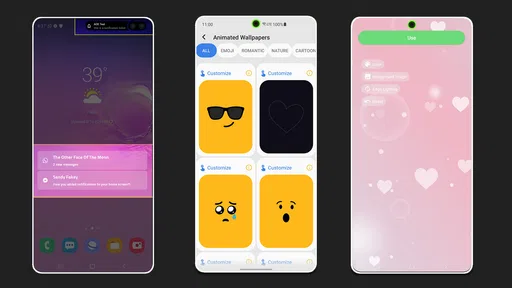
 Analysis by AppCompare
I spent time using Always On Edge Lighting & AOD as a personalization tool rather than treating it as just another wallpaper or notification app. Its main idea is simple: turn the edges of your screen into a visual alert and combine that with an always-on display. That makes it interesting for anyone who wants a phone that communicates quietly, without relying on sound or vibration every time something happens.
The app is developed by Dubiaz and is available for free, with optional in-app purchases ranging from $0.99 to $4.49 per item. It is rated for Everyone, runs on devices using Android 8.1 or later, and has reached over 10 million installs. Those figures suggest that the concept has broad appeal, but the average rating of 3.5 from around 196 thousand ratings also tells me to approach it realistically: this is useful personalization software, not a flawless replacement for every phone’s built-in display features.
How to decide whether Always On Edge is right for you
The first question is not whether the lighting looks attractive. It is whether you actually need a more visible way to notice alerts. If your phone is usually face-up on a desk, the edge effect can give you a quick visual cue without opening the screen. If your device is often across the room, inside a bag, or on silent during work, the benefit is smaller because a decorative border cannot replace a notification you cannot see.
I would judge the app using four practical criteria: visibility, control, battery behavior, and patience during setup. Visibility matters because a border animation is only helpful if it is noticeable without becoming distracting. Control matters because different people want very different behavior: some prefer a brief flash, while others want a persistent effect around the display. Battery behavior is important for any always-on feature. Finally, setup matters because personalization apps often require more adjustment than a built-in phone setting.
Always On Edge Lighting & AOD is especially appealing if you enjoy customizing the phone’s appearance and want notifications to feel more personal. It can make a plain lock screen feel intentional, particularly on a device whose standard always-on display is visually limited. I also see value for people who keep their phone muted in meetings or at home and want a glanceable signal rather than a loud interruption.
On the other hand, I would not choose it solely because the phrase “always on” sounds convenient. An always-on display can become visual clutter when it shows too much information, and edge lighting can lose its usefulness if every alert looks the same. The best experience comes from deciding which events deserve attention and keeping the rest restrained.
What the app is actually trying to improve
The app combines two ideas that are often handled separately. The first is ambient notification lighting around the screen. The second is an always-on display that keeps selected information visible while the phone is idle. In daily use, that combination feels more coherent than installing one tool for a clock and another for notification effects.
Worth Reading Before You Choose

EA SPORTS FC Mobile 26 Is a Bigger Football Game, but It Takes Time

Flipboard Shows What News Apps Must Do Beyond the Feed

Switching to Android Auto Means Rethinking Your Driving Routine

Google Calendar Makes a Crowded Week Easier to Manage

Ludo King Makes the Most of the Minutes Between Plans

Baby Panda World Brings Quick Play to Modern Phones, but Its Game Library Feels Busy
The appeal is not only cosmetic. A visual border can help separate a meaningful alert from the ordinary background activity of a phone. If I am waiting for an important message while working, a short edge animation can be easier to notice than a small icon appearing in the status bar. That is a subtle distinction, but it is where this type of app earns its place.
The trade-off is that the app sits between personalization and system behavior. Built-in phone functions are usually more predictable because they are designed for the exact device. A third-party tool has to work across many screen shapes, software versions, and manufacturer interfaces. That does not make Always On Edge a poor choice, but it explains why the experience may require experimentation rather than a single perfect setting.
Where it stands out from ordinary always-on tools
Many standard always-on displays focus on a clock, date, battery information, or a small notification symbol. That approach is clean and usually easy to understand, but it can feel static. Always On Edge adds movement and color around the screen, so the phone can communicate an event without changing the entire display.
I find the edge effect most useful when the phone is lying flat with the screen visible. Instead of repeatedly waking the device to check whether something happened, I can glance at the border. This is particularly practical at a desk, beside a bed, or on a kitchen counter. It is less useful when the phone is in a pocket, because the effect is then hidden and the always-on portion may be the only visible element.
Another strength is the ability to treat the screen border as part of the phone’s identity. A restrained color can make the feature look like an extension of the device rather than a separate notification system. A more animated style suits users who enjoy expressive customization. I recommend starting with the least dramatic effect and increasing it only if the alert is too easy to miss.
The most useful setup is usually the quietest one that you can still notice. That sounds obvious, but it prevents a common mistake: choosing a bright animation that looks impressive during setup and becomes irritating after several hours of normal notifications.
Three practical ways I would use it
My first use case would be a focused work session. I would keep the phone on silent, leave it face-up, and use a modest edge effect for selected notifications. The goal would not be to react to everything. It would be to recognize that something worth checking has arrived without breaking concentration every few minutes.
The second would be charging overnight or resting the phone on a bedside table. Here, I would keep the always-on information minimal and avoid intense movement. A soft visual cue can be helpful, but a constantly active border may be too stimulating in a dark room. This is also where I would pay closest attention to battery preferences and whether the display remains active longer than I actually need.
The third would be accessibility by visibility rather than sound. Some users notice a bright border more quickly than a short vibration, especially in a noisy environment. The app cannot solve every accessibility need, but it offers another channel for awareness. I would still keep normal notification indicators enabled, because relying on a single visual effect is not ideal when an alert is important.
Small decisions that make a large difference
A useful workflow is to separate “I want to know something happened” from “I need to act immediately.” The first group can use a brief, subtle effect. The second may deserve a more distinctive color or animation. If every app receives the same treatment, the border becomes a general decoration and loses its value as a signal.
I would also test the effect against the phone’s usual background. A color that looks clear on a dark screen may disappear against a bright one. Testing in daylight and at night is worthwhile because visibility changes dramatically. This is one of the less obvious strengths of a customizable edge system: it can be tuned to the way you actually place and view your phone, rather than judged only from a settings preview.
Another tip is to check the experience after using the phone normally for a full day. During setup, animated borders feel fresh. After repeated alerts, they can become visual noise. If I found myself looking at the effect without learning anything useful, I would reduce its intensity or limit it to fewer situations. Personalization should reduce friction, not create another stream of interruptions.
The always-on portion deserves the same discipline. A clock is useful at a glance, but additional elements can make the screen harder to read. I prefer an arrangement that answers one question quickly: what time is it, and is there something I should check? If the display turns into a miniature dashboard, the feature begins to compete with the phone itself.
Where built-in tools may be the better choice
The strongest alternative is the phone’s own always-on display or notification lighting, when those features are available. Built-in tools generally have the advantage of fitting the hardware and software more naturally. They may also feel more stable after system updates because they are part of the device’s own interface. If you only want a clock and a simple notification icon, the built-in option may be cleaner and easier.
A dedicated wallpaper or lock-screen personalization app may suit someone who cares more about static appearance than alerts. Those apps usually focus on images, themes, or visual layouts, while Always On Edge is more about active feedback. Choosing between them depends on whether your priority is how the phone looks while idle or how it communicates incoming activity.
There is also a case for using no extra app at all. If you already notice vibrations, sounds, lock-screen icons, and the standard notification shade, adding an animated border may not improve your routine. Every additional layer of notification design has a cost in attention. For a minimalist user, the absence of movement can be a feature rather than a limitation.
I would also be cautious if your phone has unusual screen edges, a heavily modified Android interface, or strict battery management. The app supports Android 8.1 and newer, but compatibility on paper does not guarantee that every manufacturer’s behavior will feel identical. If you need absolute predictability for work alerts, the system’s own notification tools remain the safer first choice.
What to expect before installing
The app is free to start, which makes it easy to test without committing money immediately. Optional purchases are available, with individual items priced from $0.99 to $4.49. I would use the free experience long enough to answer practical questions: Can I see the effect from my normal seating position? Does the always-on display show the information I actually need? Does the visual style remain comfortable after repeated notifications?
The current version is 9.6.8, and the app has been available since June 20, 2018. That long presence matters because this is not a brand-new experiment in screen effects. Still, a mature app can have both advantages and complications: it may offer more refined customization, while also carrying more settings than a casual user wants to manage.
Installation is only the beginning of the cost of switching. The real cost is time spent deciding how the app should behave. You may need to compare the effect with your existing lock-screen notifications, adjust the display so it is readable, and decide which alerts deserve a special treatment. If you change phones later, you may need to repeat that tuning because the screen and system interface can alter how the result looks.
That switching cost is acceptable for enthusiasts and people with a clear need. It is less attractive for someone who wants a feature that works perfectly with no adjustment. I would not call the app difficult, but I would call it configurable enough that careless setup can produce an experience that feels busier than expected.
Who should skip it
I would skip Always On Edge Lighting & AOD if your main goal is saving every possible bit of battery and you do not care about glanceable information. An always-on feature is designed to keep something visible, so it naturally deserves more scrutiny than a static wallpaper. I would also skip it if your phone already provides a notification effect that you find clear and reliable.
It may not be the right match for people who dislike animated interfaces, need a completely distraction-free bedside display, or rarely keep the phone visible. The edge lighting has no practical value when the screen is covered, and the decorative side of the app may feel unnecessary if your phone is mainly a tool for calls and messages.
Finally, users who expect one universal configuration to suit every situation may become frustrated. A setting that works at a desk may be too bright at night. A color that looks distinctive for one alert may blend into another background. The app rewards small adjustments, so it is better for someone willing to tune it than for someone who wants to set it once and forget it.
My recommendation after weighing the trade-offs
For me, Always On Edge Lighting & AOD is worth trying when the phone’s built-in display feels too plain or when ordinary notifications are easy to miss. Its strongest role is not turning the screen into a spectacle. It is giving important alerts a quick visual identity while keeping the phone readable at a glance.
I would begin with a restrained always-on layout, a short edge effect, and only a small group of meaningful notifications. After a day or two, I would remove anything that does not help me make a decision. That approach reveals the app’s genuine value much faster than enabling every visual option at once.
The average rating of 3.5 is a fair reminder that this kind of software depends heavily on personal expectations and device context. Some users will enjoy the control and appearance; others will prefer the simplicity of built-in Android tools. With over 10 million installs, it is clearly a familiar option in the personalization space, but popularity should not replace testing it on your own routine.
My clear recommendation is to try it if you want visible, customizable alerts and enjoy shaping the look of your phone. I would choose a built-in alternative instead if reliability, minimal battery impact, or zero setup matters more than expressive notification lighting. For the right user, Always On Edge Lighting & AOD turns an idle screen into a useful visual signal. For everyone else, its extra animation may simply be another layer to manage.
Pros
- Highly customizable edge-lighting colors
- patterns
- and animation speeds.
- Supports lighting effects for notifications from selected apps.
- Works with many screen styles
- including curved and flat displays.
- Offers useful AOD customization for clocks
- colors
- and layouts.
- Can help you notice alerts without unlocking your phone.
Cons
- Some advanced features may require in-app purchases or premium access.
- Continuous lighting and AOD use can increase battery consumption.
- Initial setup may require several permissions and accessibility access.
- Compatibility can vary between phone brands and Android versions.
- Too many customization options may make setup feel complicated.
FAQs for Always On Edge Lighting & AOD
What is Always On Edge Lighting & AOD used for?
Always On Edge Lighting & AOD is designed to make notifications more noticeable and visually appealing. It can display colorful edge lighting around the screen, show an always-on display with useful information, and provide notification effects when messages or calls arrive. After testing its main features, I found it particularly useful for users who want quick status information without constantly unlocking their phone.
Does Always On Edge Lighting & AOD work on every Android phone?
The application supports many Android devices, but the available features can vary depending on the phone model, Android version, display technology, and manufacturer settings. Some devices may offer smoother edge animations or better always-on display support than others. Before downloading, users should check the app’s compatibility details and remember that battery optimization or system restrictions may prevent certain effects from working continuously.
Does the app consume a lot of battery?
Battery usage depends on which functions you enable and how frequently they appear. A simple notification edge effect usually has a limited impact, while a constantly active always-on display, animated wallpapers, or repeated lighting effects can use more power. In my experience, adjusting animation duration, brightness, screen timeout, and notification frequency is important for maintaining a reasonable balance between appearance and battery life.
What permissions does Always On Edge Lighting & AOD require?
The app may request permissions related to notifications, displaying content over other applications, accessibility services, and background operation. These permissions allow it to detect incoming alerts and show lighting effects on top of the lock screen or other screens. Users should read each permission request carefully and enable only what is necessary. Some features may not function correctly if required access is denied.
Is Always On Edge Lighting & AOD free to use?
Always On Edge Lighting & AOD can generally be downloaded and used with basic features at no initial cost, although availability may depend on the version offered through the app store. Additional designs, customization tools, or an ad-free experience may require in-app purchases or a subscription. Users should review the current store listing and payment terms before activating any premium feature, especially if automatic renewal is involved.


